Stop your Paper/Spigot server before uploading any files.
2
Upload the addon files
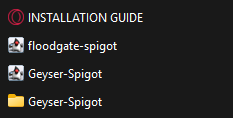
Open the addon files and locate the Paper/Spigot files. Drag and drop the following items directly into your server’s plugins folder:
Inside the Bedrock Compatibility Folder
Your plugins folder should look similar to this:
plugins
Geyser-Spigot.jar
floodgate-spigot.jar
Geyser-Spigot
3
Configure Geyser
Start your server once to allow Floodgate to generate its configuration files, then stop the server again.Follow the official Geyser setup guide to configure the correct IP address and Bedrock port for your host. Make sure the required Bedrock port is available through your hosting provider or firewall.
4
Enable Floodgate
Download key.pem from plugins/floodgate/, then upload it to plugins/Geyser-Spigot/.
plugins
Geyser-Spigot
key.pem
floodgate
key.pem
Floodgate lets Bedrock Edition players join your server even when they do not own a Java Edition account.
5
Start your server
Save your configuration and start the server again. Bedrock players can then connect using the address and port configured for Geyser.
Keep your Java server address and the Bedrock address/port written down separately. Geyser’s Bedrock port is often different from the standard Java server port.
{"docsConfig":{"theme":"almond","$schema":"https://mintlify.com/docs.json","name":"Ph4ntomizations Wiki","colors":{"primary":"#7D68FF","light":"#7D68FF","dark":"#7D68FF"},"logo":{"light":"https://mintcdn.com/ph4ntomizations/0JxNgUPWttyHCRIg/logo/light.svg?fit=max\u0026auto=format\u0026n=0JxNgUPWttyHCRIg\u0026q=85\u0026s=5e200cc319e6995370701c0b99016430","dark":"https://mintcdn.com/ph4ntomizations/0JxNgUPWttyHCRIg/logo/dark.svg?fit=max\u0026auto=format\u0026n=0JxNgUPWttyHCRIg\u0026q=85\u0026s=401cb6e0bc6dc9429123c41b9d3c7186"},"favicon":"https://mintcdn.com/ph4ntomizations/Gz_LMDdrrPAOkxV4/favicon.svg?fit=max\u0026auto=format\u0026n=Gz_LMDdrrPAOkxV4\u0026q=85\u0026s=15678a33c682b6e7ff1bc55aa049a474","navbar":{"links":[{"href":"https://discord.ph4ntom.org","label":""}],"primary":{"type":"button","label":"Join Discord","href":"https://discord.ph4ntom.org"}},"footer":{"socials":{"website":"https://info.ph4ntom.org","linkedin":"https://www.linkedin.com/in/aayan-hassan","discord":"https://discord.ph4ntom.org"}},"banner":{"content":"🛏️ [**BEDWARS - Premium Server Setup**](https://builtbybit.com/resources/bedwars-premium-server-setup.128424/) has been released! [Check it out!](https://builtbybit.com/resources/bedwars-premium-server-setup.128424/)","dismissible":true,"color":{"light":"#E2292B","dark":"#E2292B"}},"contextual":{"options":["copy","view","chatgpt","claude","perplexity","mcp","cursor","vscode"],"display":"header"},"styling":{"latex":false},"navigation":{"global":{"anchors":[{"anchor":"View Products","icon":"boxes-packing","href":"https://ph4ntom.org/resources"},{"anchor":"Help \u0026 Support","icon":"discord","href":"https://discord.ph4ntom.org"}]},"pages":[]}},"deployment":{"deploymentMetadataValue":{"subdomain":"ph4ntomizations","hasAudioNarration":false,"actualSubdomain":"ph4ntomizations","customDomains":["wiki.ph4ntom.org"],"gitSource":{"type":"github","owner":"ph4ntooom","repo":"wiki.ph4ntom.org","deployBranch":"main","contentDirectory":"","isPrivate":false,"mountPath":"","label":""},"chroma":{"liveDeploymentHistoryId":"6acbb3494d7c90b307698a6c","collectionId":"4d4f5226-3074-437c-9302-658bbdb2a280","schemaVersion":"v3","latestBuiltDeploymentHistoryId":"6acbb3494d7c90b307698a6c"},"entitlements":{},"buildId":"6acbb3494d7c90b307698a6c","clientVersion":"0.0.3939","searchFilterCounts":[{"language":"default","tag":"Home","count":46},{"language":"default","tag":"Configurations","count":22},{"language":"default","tag":"Server Setups","count":22},{"language":"default","tag":"BedWars","count":7},{"language":"default","tag":"Lifesteal","count":4},{"language":"default","tag":"Practice","count":4},{"language":"default","tag":"TNT Games","count":4},{"language":"default","tag":"AdvancedBan","count":3},{"language":"default","tag":"LiteBans","count":3},{"language":"default","tag":"LuckPerms","count":3}]},"assistantConfig":{"enableAskAiButton":false,"enableStarterQuestions":false,"enableAskAiSearchBar":true},"hasChatPermissions":false,"hasWebMcpPermissions":false,"toggles":[{"name":"kill-isr","enabled":true,"variant":{"name":"disabled","enabled":false,"feature_enabled":true},"impressionData":false},{"name":"agent-mintlify-slack","enabled":true,"variant":{"name":"disabled","enabled":false,"feature_enabled":true},"impressionData":false},{"name":"editor-v7-file-tree","enabled":true,"variant":{"name":"disabled","enabled":false,"feature_enabled":true},"impressionData":false},{"name":"agent-integrations-settings","enabled":true,"variant":{"name":"disabled","enabled":false,"feature_enabled":true},"impressionData":false},{"name":"automations-pr-grouping","enabled":true,"variant":{"name":"disabled","enabled":false,"feature_enabled":true},"impressionData":false},{"name":"custom-prefix","enabled":true,"variant":{"name":"disabled","enabled":false,"feature_enabled":true},"impressionData":false},{"name":"analytics-v7","enabled":true,"variant":{"name":"disabled","enabled":false,"feature_enabled":true},"impressionData":false},{"name":"user-flows-analytics","enabled":true,"variant":{"name":"disabled","enabled":false,"feature_enabled":true},"impressionData":false},{"name":"no-publish-flow","enabled":true,"variant":{"name":"disabled","enabled":false,"feature_enabled":true},"impressionData":false},{"name":"workos-onboarding","enabled":true,"variant":{"name":"disabled","enabled":false,"feature_enabled":true},"impressionData":false},{"name":"llms-txt-v2","enabled":true,"variant":{"name":"disabled","enabled":false,"feature_enabled":true},"impressionData":false},{"name":"pause-universal-search-reconcile","enabled":true,"variant":{"name":"disabled","enabled":false,"feature_enabled":true},"impressionData":false},{"name":"snapshot-serving-live","enabled":true,"variant":{"name":"disabled","enabled":false,"feature_enabled":true},"impressionData":false},{"name":"stripTemperatureMiddleware","enabled":true,"variant":{"name":"disabled","enabled":false,"feature_enabled":true},"impressionData":false},{"name":"per-site-search-delta","enabled":true,"variant":{"name":"disabled","enabled":false,"feature_enabled":true},"impressionData":false},{"name":"support-platform-pylon-zendesk","enabled":true,"variant":{"name":"disabled","enabled":false,"feature_enabled":true},"impressionData":false},{"name":"snapshot-serving","enabled":true,"variant":{"name":"disabled","enabled":false,"feature_enabled":true},"impressionData":false},{"name":"instant-rollback","enabled":true,"variant":{"name":"disabled","enabled":false,"feature_enabled":true},"impressionData":false},{"name":"granular-notifications-server","enabled":true,"variant":{"name":"disabled","enabled":false,"feature_enabled":true},"impressionData":false},{"name":"granular-notifications","enabled":true,"variant":{"name":"disabled","enabled":false,"feature_enabled":true},"impressionData":false},{"name":"editor-private-page-search","enabled":true,"variant":{"name":"disabled","enabled":false,"feature_enabled":true},"impressionData":false},{"name":"automations-fable","enabled":true,"variant":{"name":"disabled","enabled":false,"feature_enabled":true},"impressionData":false},{"name":"fixed-ai-action-pricing","enabled":true,"variant":{"name":"disabled","enabled":false,"feature_enabled":true},"impressionData":false},{"name":"automation-resolve-merge-conflict","enabled":true,"variant":{"name":"disabled","enabled":false,"feature_enabled":true},"impressionData":false},{"name":"scoped-publishing","enabled":true,"variant":{"name":"disabled","enabled":false,"feature_enabled":true},"impressionData":false},{"name":"mintql","enabled":true,"variant":{"name":"disabled","enabled":false,"feature_enabled":true},"impressionData":false},{"name":"page-level-analytics","enabled":true,"variant":{"name":"disabled","enabled":false,"feature_enabled":true},"impressionData":false},{"name":"editor-version-history-v2","enabled":true,"variant":{"name":"disabled","enabled":false,"feature_enabled":true},"impressionData":false},{"name":"editor-nav-generations","enabled":true,"variant":{"name":"disabled","enabled":false,"feature_enabled":true},"impressionData":false},{"name":"billing-page-v2","enabled":true,"variant":{"name":"disabled","enabled":false,"feature_enabled":true},"impressionData":false},{"name":"workspace-projects","enabled":true,"variant":{"name":"disabled","enabled":false,"feature_enabled":true},"impressionData":false},{"name":"assistant-v5","enabled":true,"variant":{"name":"disabled","enabled":false,"feature_enabled":true},"impressionData":false},{"name":"byok-sep-25","enabled":true,"variant":{"name":"disabled","enabled":false,"feature_enabled":true},"impressionData":false},{"name":"fork-pr-previews","enabled":true,"variant":{"name":"disabled","enabled":false,"feature_enabled":true},"impressionData":false},{"name":"revalidation-jwt","enabled":true,"variant":{"name":"disabled","enabled":false,"feature_enabled":true},"impressionData":false},{"name":"vite-origin","enabled":true,"variant":{"name":"disabled","enabled":false,"feature_enabled":true},"impressionData":false},{"name":"editor-agent-model-picker","enabled":true,"variant":{"name":"disabled","enabled":false,"feature_enabled":true},"impressionData":false},{"name":"billing-updated-9-15","enabled":true,"variant":{"name":"disabled","enabled":false,"feature_enabled":true},"impressionData":false},{"name":"hobby-abuse-scan","enabled":true,"variant":{"name":"disabled","enabled":false,"feature_enabled":true},"impressionData":false},{"name":"dashboard-inbox","enabled":true,"variant":{"name":"disabled","enabled":false,"feature_enabled":true},"impressionData":false}],"isAtlas":false,"googleFontsInlined":true},"customCss":[],"page":{"pagePath":"server-setups/bedwars/bedrock-setup","slug":"/server-setups/bedwars/bedrock-setup","pageMetadata":{"title":"Bedrock Setup","description":"Install and configure Bedrock Compatibility for the BedWars server setup.","icon":"mobile-screen","href":"/server-setups/bedwars/bedrock-setup"},"description":{"compiledSource":"\"use strict\";\nconst {jsx: _jsx} = arguments[0];\nconst {useMDXComponents: _provideComponents} = arguments[0];\nfunction _createMdxContent(props) {\n const _components = {\n p: \"p\",\n ..._provideComponents(),\n ...props.components\n };\n return _jsx(_components.p, {\n children: \"Install and configure Bedrock Compatibility for the BedWars server setup.\"\n });\n}\nfunction MDXContent(props = {}) {\n const {wrapper: MDXLayout} = {\n ..._provideComponents(),\n ...props.components\n };\n return MDXLayout ? _jsx(MDXLayout, {\n ...props,\n children: _jsx(_createMdxContent, {\n ...props\n })\n }) : _createMdxContent(props);\n}\nreturn {\n default: MDXContent\n};\n","frontmatter":{},"scope":{}},"pageType":"default","mdx":{"mdxSource":{"compiledSource":"\"use strict\";const{Fragment:_Fragment,jsx:_jsx,jsxs:_jsxs}=arguments[0];const{useMDXComponents:_provideComponents}=arguments[0];function _createMdxContent(props){const _components={a:`a`,code:`code`,li:`li`,p:`p`,strong:`strong`,ul:`ul`,..._provideComponents(),...props.components},{Frame,Heading,Info,Note,OptimizedImage,Step,Steps,Tip,Tree}=_components;if(!Frame)_missingMdxReference(`Frame`,true);if(!Heading)_missingMdxReference(`Heading`,true);if(!Info)_missingMdxReference(`Info`,true);if(!Note)_missingMdxReference(`Note`,true);if(!OptimizedImage)_missingMdxReference(`OptimizedImage`,true);if(!Step)_missingMdxReference(`Step`,true);if(!Steps)_missingMdxReference(`Steps`,true);if(!Tip)_missingMdxReference(`Tip`,true);if(!Tree)_missingMdxReference(`Tree`,true);if(!Tree.File)_missingMdxReference(`Tree.File`,true);if(!Tree.Folder)_missingMdxReference(`Tree.Folder`,true);return _jsxs(_Fragment,{children:[_jsxs(Note,{color:`#7d68ff`,children:[_jsx(_components.p,{children:_jsx(_components.strong,{children:`BEDROCK COMPATIBILITY ADDON`})}),_jsx(_components.p,{children:`This separately purchased add-on is only needed when you want Minecraft Bedrock Edition players to join your BedWars server.`}),_jsx(_components.p,{children:_jsx(_components.a,{href:`https://builtbybit.com/resources/bedwars-premium-server-setup.128424/`,children:`Click here to Purchase the Bedrock Compatibility Addon`})})]}),`\n`,_jsx(Heading,{level:`2`,id:`overview`,children:`Overview`}),`\n`,_jsx(_components.p,{children:`Thank you for purchasing the Bedrock Compatibility Addon! It allows Minecraft Bedrock Edition players to join your Paper/Spigot BedWars server.`}),`\n`,_jsx(Heading,{level:`2`,id:`installation`,children:`Installation`}),`\n`,_jsxs(Steps,{children:[_jsx(Step,{title:`Stop your server`,children:_jsx(_components.p,{children:`Stop your Paper/Spigot server before uploading any files.`})}),_jsxs(Step,{title:`Upload the addon files`,children:[_jsxs(_components.p,{children:[`Open the addon files and locate the Paper/Spigot files. Drag and drop the following items directly into your server’s `,_jsx(_components.code,{children:`plugins`}),` folder:`]}),_jsx(Frame,{caption:`Inside the Bedrock Compatibility Folder`,children:_jsx(OptimizedImage,{src:`https://cdn.ph4ntom.org/2026/10/sexIltI6Vh.png`})}),_jsx(_components.p,{children:`Your plugins folder should look similar to this:`}),_jsx(Tree,{children:_jsxs(Tree.Folder,{name:`plugins`,defaultOpen:true,children:[_jsx(Tree.File,{name:`Geyser-Spigot.jar`}),_jsx(Tree.File,{name:`floodgate-spigot.jar`}),_jsxs(Tree.Folder,{name:`Geyser-Spigot`,children:[_jsx(Tree.Folder,{name:`cache`}),_jsx(Tree.Folder,{name:`locales`}),_jsx(Tree.File,{name:`config.yml`})]})]})})]}),_jsxs(Step,{title:`Configure Geyser`,children:[_jsx(_components.p,{children:`Start your server once to allow Floodgate to generate its configuration files, then stop the server again.`}),_jsxs(_components.p,{children:[`Follow the `,_jsx(_components.a,{href:`https://wiki.geysermc.org/geyser/setup/`,children:`official Geyser setup guide`}),` to configure the correct IP address and Bedrock port for your host. Make sure the required Bedrock port is available through your hosting provider or firewall.`]})]}),_jsxs(Step,{title:`Enable Floodgate`,children:[_jsxs(_components.p,{children:[`Download `,_jsx(_components.code,{children:`key.pem`}),` from `,_jsx(_components.code,{children:`plugins/floodgate/`}),`, then upload it to `,_jsx(_components.code,{children:`plugins/Geyser-Spigot/`}),`.`]}),_jsx(Tree,{children:_jsxs(Tree.Folder,{name:`plugins`,defaultOpen:true,children:[_jsx(Tree.Folder,{name:`Geyser-Spigot`,defaultOpen:true,children:_jsx(Tree.File,{name:`key.pem`,highlight:true})}),_jsx(Tree.Folder,{name:`floodgate`,defaultOpen:true,children:_jsx(Tree.File,{name:`key.pem`,highlight:true})})]})}),_jsx(Info,{children:_jsx(_components.p,{children:`Floodgate lets Bedrock Edition players join your server even when they do not own a Java Edition account.`})})]}),_jsx(Step,{title:`Start your server`,children:_jsx(_components.p,{children:`Save your configuration and start the server again. Bedrock players can then connect using the address and port configured for Geyser.`})})]}),`\n`,_jsx(Tip,{children:_jsx(_components.p,{children:`Keep your Java server address and the Bedrock address/port written down separately. Geyser’s Bedrock port is often different from the standard Java server port.`})}),`\n`,_jsx(Heading,{level:`2`,id:`troubleshooting`,children:`Troubleshooting`}),`\n`,_jsx(_components.p,{children:`If Bedrock players cannot connect, check the following:`}),`\n`,_jsxs(_components.ul,{children:[`\n`,_jsx(_components.li,{children:`Confirm the IP address and Bedrock port in Geyser’s configuration are correct.`}),`\n`,_jsx(_components.li,{children:`Make sure the Bedrock port is enabled by your hosting provider and allowed through any firewall.`}),`\n`,_jsx(_components.li,{children:`Check that Geyser and Floodgate are compatible with your server version.`}),`\n`,_jsxs(_components.li,{children:[`If needed, download the current plugin versions from `,_jsx(_components.a,{href:`https://geysermc.org/download`,children:`geysermc.org/download`}),`.`]}),`\n`,_jsx(_components.li,{children:`Check your server console and Geyser logs for errors.`}),`\n`]}),`\n`,_jsx(Heading,{level:`2`,id:`get-support`,children:`Get support`}),`\n`,_jsxs(_components.p,{children:[`Still having trouble? Contact us via `,_jsx(_components.a,{href:`https://discord.gg/9tt9WqFHbr`,children:`Discord`}),`.`]})]})}function MDXContent(props={}){const{wrapper:MDXLayout}={..._provideComponents(),...props.components};return MDXLayout?_jsx(MDXLayout,{...props,children:_jsx(_createMdxContent,{...props})}):_createMdxContent(props)}return{default:MDXContent};function _missingMdxReference(id,component){throw new Error(`Expected `+(component?`component`:`object`)+\" `\"+id+\"` to be defined: you likely forgot to import, pass, or provide it.\")}","frontmatter":{},"scope":{"config":{},"pageMetadata":{"title":"Bedrock Setup","description":"Install and configure Bedrock Compatibility for the BedWars server setup.","icon":"mobile-screen","href":"/server-setups/bedwars/bedrock-setup"}}},"mdxSourceWithNoJs":null},"mdxExtracts":{"tableOfContents":[{"title":"Overview","slug":"overview","depth":2,"children":[]},{"title":"Installation","slug":"installation","depth":2,"children":[]},{"title":"Troubleshooting","slug":"troubleshooting","depth":2,"children":[]},{"title":"Get support","slug":"get-support","depth":2,"children":[]}],"codeExamples":{}},"jsLinks":[],"subdomain":"ph4ntomizations","siteName":"Ph4ntomizations Wiki","title":"Bedrock Setup - Ph4ntomizations Wiki","navMaps":{"firstHrefInVersion":{},"firstHrefInLanguage":{}},"lastModified":"2026-10-11T16:03:23.790Z","originalFileLocation":"server-setups/bedwars/bedrock-setup.mdx"},"headHtml":"\u003cscript data-mint-head>(function(){var d=document.documentElement,p=null;if(!p){try{p=localStorage.getItem(\"isDarkMode\")}catch(e){}if(p==='true')p='dark';else if(p==='false')p='light';if(p!=='light'\u0026\u0026p!=='dark'\u0026\u0026p!=='system')p=\"system\"}var r=p==='system'?(matchMedia(\"(prefers-color-scheme: dark)\").matches?'dark':'light'):p;d.classList.remove(r==='dark'?'light':'dark');d.classList.add(r);d.setAttribute(\"data-theme-preference\",p)})();\u003c/script>\u003cmeta data-mint-head name=\"description\" content=\"Install and configure Bedrock Compatibility for the BedWars server setup.\">\u003cmeta data-mint-head name=\"application-name\" content=\"Ph4ntomizations Wiki\">\u003cmeta data-mint-head name=\"generator\" content=\"Mintlify\">\u003clink data-mint-head rel=\"icon\" type=\"image/png\" sizes=\"192x192\" href=\"/mintlify-assets/_mintlify/favicons/ph4ntomizations/72ZNM5NNcz9CATi6/_generated/favicon/android-chrome-192x192.png\" media=\"(prefers-color-scheme: light)\">\u003clink data-mint-head rel=\"apple-touch-icon\" type=\"image/png\" sizes=\"180x180\" href=\"/mintlify-assets/_mintlify/favicons/ph4ntomizations/72ZNM5NNcz9CATi6/_generated/favicon/apple-touch-icon.png\">\u003clink data-mint-head rel=\"icon\" type=\"image/png\" sizes=\"16x16\" href=\"/mintlify-assets/_mintlify/favicons/ph4ntomizations/72ZNM5NNcz9CATi6/_generated/favicon/favicon-16x16.png\" media=\"(prefers-color-scheme: light)\">\u003clink data-mint-head rel=\"icon\" type=\"image/png\" sizes=\"32x32\" href=\"/mintlify-assets/_mintlify/favicons/ph4ntomizations/72ZNM5NNcz9CATi6/_generated/favicon/favicon-32x32.png\" media=\"(prefers-color-scheme: light)\">\u003clink data-mint-head rel=\"shortcut icon\" type=\"image/x-icon\" href=\"/mintlify-assets/_mintlify/favicons/ph4ntomizations/72ZNM5NNcz9CATi6/_generated/favicon/favicon.ico\" media=\"(prefers-color-scheme: light)\">\u003clink data-mint-head rel=\"icon\" type=\"image/png\" sizes=\"192x192\" href=\"/mintlify-assets/_mintlify/favicons/ph4ntomizations/72ZNM5NNcz9CATi6/_generated/favicon-dark/android-chrome-192x192.png\" media=\"(prefers-color-scheme: dark)\">\u003clink data-mint-head rel=\"icon\" type=\"image/png\" sizes=\"16x16\" href=\"/mintlify-assets/_mintlify/favicons/ph4ntomizations/72ZNM5NNcz9CATi6/_generated/favicon-dark/favicon-16x16.png\" media=\"(prefers-color-scheme: dark)\">\u003clink data-mint-head rel=\"icon\" type=\"image/png\" sizes=\"32x32\" href=\"/mintlify-assets/_mintlify/favicons/ph4ntomizations/72ZNM5NNcz9CATi6/_generated/favicon-dark/favicon-32x32.png\" media=\"(prefers-color-scheme: dark)\">\u003clink data-mint-head rel=\"shortcut icon\" type=\"image/x-icon\" href=\"/mintlify-assets/_mintlify/favicons/ph4ntomizations/72ZNM5NNcz9CATi6/_generated/favicon-dark/favicon.ico\" media=\"(prefers-color-scheme: dark)\">\u003cmeta data-mint-head property=\"og:title\" content=\"Bedrock Setup - Ph4ntomizations Wiki\">\u003cmeta data-mint-head property=\"og:description\" content=\"Install and configure Bedrock Compatibility for the BedWars server setup.\">\u003cmeta data-mint-head property=\"og:site_name\" content=\"Ph4ntomizations Wiki\">\u003cmeta data-mint-head property=\"og:url\" content=\"https://wiki.ph4ntom.org/server-setups/bedwars/bedrock-setup\">\u003cmeta data-mint-head property=\"og:type\" content=\"website\">\u003cmeta data-mint-head property=\"og:image\" content=\"https://ph4ntomizations.mintlify.app/_mintlify/api/og/v2?division=BedWars\u0026amp;title=Bedrock+Setup\u0026amp;description=Install+and+configure+Bedrock+Compatibility+for+the+BedWars+server+setup.\u0026amp;theme=d2884d53f37bfd85e136f054\u0026amp;signature=f07efa40e3b6c42240351a04160b1fd23b9800a18504dfe7cd217f236609151b\">\u003cmeta data-mint-head property=\"og:image:width\" content=\"1200\">\u003cmeta data-mint-head property=\"og:image:height\" content=\"630\">\u003cmeta data-mint-head name=\"twitter:card\" content=\"summary_large_image\">\u003cmeta data-mint-head name=\"twitter:title\" content=\"Bedrock Setup - Ph4ntomizations Wiki\">\u003cmeta data-mint-head name=\"twitter:description\" content=\"Install and configure Bedrock Compatibility for the BedWars server setup.\">\u003cmeta data-mint-head name=\"twitter:image\" content=\"https://ph4ntomizations.mintlify.app/_mintlify/api/og/v2?division=BedWars\u0026amp;title=Bedrock+Setup\u0026amp;description=Install+and+configure+Bedrock+Compatibility+for+the+BedWars+server+setup.\u0026amp;theme=d2884d53f37bfd85e136f054\u0026amp;signature=f07efa40e3b6c42240351a04160b1fd23b9800a18504dfe7cd217f236609151b\">\u003cmeta data-mint-head name=\"twitter:image:width\" content=\"1200\">\u003cmeta data-mint-head name=\"twitter:image:height\" content=\"630\">\u003cmeta data-mint-head name=\"msapplication-config\" content=\"/mintlify-assets/_mintlify/favicons/ph4ntomizations/72ZNM5NNcz9CATi6/_generated/favicon/browserconfig.xml\">\u003cmeta data-mint-head name=\"apple-mobile-web-app-title\" content=\"Ph4ntomizations Wiki\">\u003cmeta data-mint-head name=\"msapplication-TileColor\" content=\"#7D68FF\">\u003clink data-mint-head rel=\"canonical\" href=\"https://wiki.ph4ntom.org/server-setups/bedwars/bedrock-setup\">\u003clink data-mint-head rel=\"alternate\" type=\"application/xml\" href=\"/sitemap.xml\">\u003clink data-mint-head rel=\"alternate\" type=\"text/markdown\" href=\"/server-setups/bedwars/bedrock-setup.md\">\u003cscript data-mint-head type=\"application/ld+json\">{\"@context\":\"https://schema.org\",\"@graph\":[{\"@type\":\"Organization\",\"@id\":\"https://wiki.ph4ntom.org/#organization\",\"name\":\"Ph4ntomizations Wiki\",\"url\":\"https://wiki.ph4ntom.org\",\"logo\":{\"@type\":\"ImageObject\",\"url\":\"https://mintcdn.com/ph4ntomizations/0JxNgUPWttyHCRIg/logo/light.svg?fit=max\u0026auto=format\u0026n=0JxNgUPWttyHCRIg\u0026q=85\u0026s=5e200cc319e6995370701c0b99016430\"}},{\"@type\":\"WebSite\",\"@id\":\"https://wiki.ph4ntom.org#website\",\"name\":\"Ph4ntomizations Wiki\",\"url\":\"https://wiki.ph4ntom.org\",\"publisher\":{\"@id\":\"https://wiki.ph4ntom.org/#organization\"}},{\"@type\":\"WebPage\",\"@id\":\"https://wiki.ph4ntom.org/server-setups/bedwars/bedrock-setup#webpage\",\"url\":\"https://wiki.ph4ntom.org/server-setups/bedwars/bedrock-setup\",\"name\":\"Bedrock Setup\",\"description\":\"Install and configure Bedrock Compatibility for the BedWars server setup.\",\"dateModified\":\"2026-10-11T16:03:23.790Z\",\"isPartOf\":{\"@id\":\"https://wiki.ph4ntom.org#website\"},\"breadcrumb\":{\"@id\":\"https://wiki.ph4ntom.org/server-setups/bedwars/bedrock-setup#breadcrumb\"}},{\"@type\":\"BreadcrumbList\",\"@id\":\"https://wiki.ph4ntom.org/server-setups/bedwars/bedrock-setup#breadcrumb\",\"itemListElement\":[{\"@type\":\"ListItem\",\"position\":1,\"name\":\"Server Setups\",\"item\":\"https://wiki.ph4ntom.org/server-setups/lobby/information\"},{\"@type\":\"ListItem\",\"position\":2,\"name\":\"BedWars\",\"item\":\"https://wiki.ph4ntom.org/server-setups/bedwars/information\"},{\"@type\":\"ListItem\",\"position\":3,\"name\":\"Bedrock Setup\",\"item\":\"https://wiki.ph4ntom.org/server-setups/bedwars/bedrock-setup\"}]},{\"@type\":[\"Article\",\"TechArticle\"],\"@id\":\"https://wiki.ph4ntom.org/server-setups/bedwars/bedrock-setup#article\",\"headline\":\"Bedrock Setup\",\"name\":\"Bedrock Setup\",\"description\":\"Install and configure Bedrock Compatibility for the BedWars server setup.\",\"url\":\"https://wiki.ph4ntom.org/server-setups/bedwars/bedrock-setup\",\"mainEntityOfPage\":{\"@id\":\"https://wiki.ph4ntom.org/server-setups/bedwars/bedrock-setup#webpage\"},\"dateModified\":\"2026-10-11T16:03:23.790Z\",\"publisher\":{\"@id\":\"https://wiki.ph4ntom.org/#organization\"},\"isPartOf\":{\"@id\":\"https://wiki.ph4ntom.org#website\"}}]}\u003c/script>\u003cscript data-mint-head type=\"application/ld+json\">{\"@context\":\"https://schema.org\",\"@type\":\"WebSite\",\"name\":\"Ph4ntomizations Wiki\",\"creator\":{\"@type\":\"Organization\",\"name\":\"Mintlify\",\"url\":\"https://mintlify.com\"}}\u003c/script>","siteName":"Ph4ntomizations Wiki","nav":{"global":{"anchors":[{"anchor":"View Products","icon":"boxes-packing","href":"https://ph4ntom.org/resources"},{"anchor":"Help \u0026 Support","icon":"discord","href":"https://discord.ph4ntom.org"}]},"tabs":[{"tab":"Home","groups":[{"group":"Getting started","expanded":false,"pages":[{"title":"Ph4ntomizations","icon":"home","href":""},{"title":"Getting Started","icon":"rocket","href":"/quickstart"}]},{"group":"Server Setups","expanded":false,"pages":[{"group":"Lobby","icon":"home","expanded":false,"pages":[{"title":"Information","icon":"circle-info","href":"/server-setups/lobby/information"},{"title":"Dependencies","icon":"plug","href":"/server-setups/lobby/dependencies"},{"title":"Brandings","icon":"ribbon","href":"/server-setups/lobby/brandings"}]},{"group":"Lifesteal","icon":"heart","expanded":false,"pages":[{"title":"Information","icon":"circle-info","href":"/server-setups/lifesteal/information"},{"title":"Dependencies","icon":"plug","href":"/server-setups/lifesteal/dependencies"},{"title":"Brandings","icon":"ribbon","href":"/server-setups/lifesteal/brandings"},{"title":"FAQs","icon":"message-question","href":"/server-setups/lifesteal/faqs"}]},{"group":"Practice","icon":"swords","expanded":false,"pages":[{"title":"Information","icon":"circle-info","href":"/server-setups/practice/information"},{"title":"Brandings","icon":"ribbon","href":"/server-setups/practice/brandings"},{"title":"Credits","icon":"heart","href":"/server-setups/practice/crediting"},{"title":"FAQs","icon":"message-question","href":"/server-setups/practice/faqs"}]},{"group":"TNT Games","icon":"bomb","expanded":false,"pages":[{"title":"Information","icon":"circle-info","href":"/server-setups/tnt-games/information"},{"title":"Brandings","icon":"ribbon","href":"/server-setups/tnt-games/brandings"},{"title":"Credits","icon":"heart","href":"/server-setups/tnt-games/crediting"},{"title":"FAQs","icon":"message-question","href":"/server-setups/tnt-games/faqs"}]},{"group":"BedWars","icon":"bed","expanded":false,"pages":[{"title":"Information","icon":"circle-info","href":"/server-setups/bedwars/information"},{"title":"Bundle \u0026 Savings","icon":"tags","href":"/server-setups/bedwars/bundle"},{"title":"Dependencies","icon":"plug","href":"/server-setups/bedwars/dependencies"},{"title":"Brandings","description":"Customize the BedWars server name, links, messages, and visual identity.","icon":"ribbon","href":"/server-setups/bedwars/brandings"},{"title":"Bedrock Setup","icon":"mobile-screen","href":"/server-setups/bedwars/bedrock-setup"},{"title":"Credits","description":"Map attribution for the BedWars server setup.","icon":"heart","href":"/server-setups/bedwars/crediting"},{"title":"FAQs","icon":"message-question","href":"/server-setups/bedwars/faqs"}]}]},{"group":"Configurations","expanded":false,"pages":[{"group":"TAB \u0026 Scoreboard","icon":"table","expanded":false,"pages":[{"title":"Installation","icon":"download","href":"/configurations/tab-and-scoreboard/installation"},{"title":"Brandings","icon":"ribbon","href":"/configurations/tab-and-scoreboard/brandings"},{"title":"FAQs","icon":"message-question","href":"/configurations/tab-and-scoreboard/faqs"}]},{"group":"LiteBans","icon":"gavel","expanded":false,"pages":[{"title":"Installation","icon":"download","href":"/configurations/litebans/installation"},{"title":"Brandings","icon":"ribbon","href":"/configurations/litebans/brandings"},{"title":"FAQs","icon":"message-question","href":"/configurations/litebans/faqs"}]},{"group":"Leaderboards","icon":"medal","expanded":false,"pages":[{"title":"Installation","icon":"download","href":"/configurations/leaderboards/installation"},{"title":"FAQs","icon":"message-question","href":"/configurations/leaderboards/faqs"}]},{"group":"LuckPerms","icon":"shield","expanded":false,"pages":[{"title":"Information","icon":"circle-info","href":"/configurations/luckperms/information"},{"title":"Installation","icon":"download","href":"/configurations/luckperms/installation"},{"title":"FAQs","icon":"message-question","href":"/configurations/luckperms/faqs"}]},{"group":"AdvancedBan","icon":"ban","expanded":false,"pages":[{"title":"Installation","icon":"download","href":"/configurations/advancedban/installation"},{"title":"Brandings","icon":"ribbon","href":"/configurations/advancedban/brandings"},{"title":"FAQs","icon":"circle-question","href":"/configurations/advancedban/faqs"}]},{"group":"Infinite Announcements","icon":"bell","expanded":false,"pages":[{"title":"Installation","icon":"download","href":"/configurations/infinite-announcements/installation"},{"title":"Brandings","icon":"ribbon","href":"/configurations/infinite-announcements/brandings"}]},{"group":"Graves","icon":"skull","expanded":false,"pages":[{"title":"Installation","icon":"download","href":"/configurations/graves/installation"}]},{"group":"Shop GUI Plus","icon":"store","expanded":false,"pages":[{"title":"Installation","icon":"download","href":"/configurations/shopgui-plus/installation"}]},{"group":"O'Daily Quests","icon":"scroll","expanded":false,"pages":[{"title":"Installation","icon":"download","href":"/configurations/daily-quests/installation"}]},{"group":"EssentialsX","icon":"wand-magic-sparkles","expanded":false,"pages":[{"title":"Installation","icon":"download","href":"/configurations/essentialsx/installation"}]},{"group":"Crazy Envoys","icon":"gift","expanded":false,"pages":[{"title":"Installation","icon":"download","href":"/configurations/crazy-envoys/installation"}]},{"group":"Excellent Crates","icon":"box","expanded":false,"pages":[{"title":"Installation","icon":"download","href":"/configurations/excellent-crates/installation"}]}]}]},{"tab":"Legal","pages":[{"title":"Legal","href":"/legal/terms-of-service"}]}]},"title":"Bedrock Setup - Ph4ntomizations Wiki","buildId":"dpl_5UDDZ9hnigTkoV7QtvQ39eUp84nu","deploymentId":"dpl_5UDDZ9hnigTkoV7QtvQ39eUp84nu","dynamics":["10e4515597","07c022d89b","a74be98ba7"],"chunks":["BannerMarkdown-DDchecE6.js","dist-Bv80vOZR.js","lib--scc4DXi.js","lib-B8HbPgcC.js","clsx-BLvOhwI7.js","html-void-elements-mCSPHezU.js","katex-YMM-FMeD.js","marked.esm-CZWythHk.js","Frame-CUTvSGqu.js","DynamicMarkdown-BGu84FgU.js","zoom-image-lightbox-ChyC7Hte.js","PlusIcon-DXkY3IBj.js","lightbox-handle-r17bVUz3.js"]}